
After-Hours Call Answering for Restoration Companies
Never Lose Another Valuable After-Hours Water Damage Job
VizOptimize answers after-hours water damage calls, qualifies emergency leads, captures the job details and alerts your on-call team. Keep your existing number and CRM.
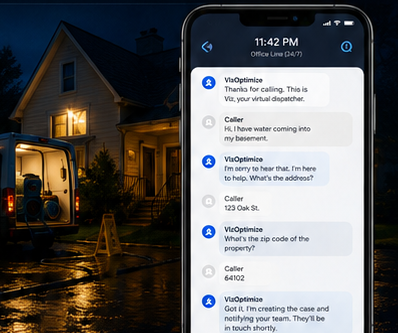
Answers When You Need Coverage
Never miss an after-hours call again.
Qualifies Every Lead
Captures critical details and urgency.
Alerts Your Team Immediately
Lead details sent to your configured responder.
More Jobs. More Revenue.
Turn every call into a chance to win.
Your office at 11:42 PM
Voicemail. Missed calls. Lost revenue.
VizOptimize at 11:42 PM
Answers instantly. Captures the lead. Notifies your team.
The Expensive Option Is Missing the Call
You already invested in marketing, referrals and reputation to make the phone ring. If nobody answers, a high-value emergency can become your competitor’s job in minutes.
Approximate wages for one full-time customer service representative at the U.S. median wage of $21.53/hour.
An illustrative example: miss 10 after-hours opportunities per month, and assume only 1 in 10 would have become a job.
1 × $3,868 average project spend = ~$3,868/month
~$46,416/year in potential project value
VizOptimize Lite starts at $297/month. HomeAdvisor reports average homeowner spending of about $3,868 on a water-damage restoration project.
Your competitor only has to answer once.
The homeowner with water coming through the ceiling is unlikely to wait until morning. Answer immediately, qualify the loss and give your team the chance to win the job before the caller moves on.
How VizOptimize Works
Simple enough to understand in seconds. Specific enough to handle restoration emergencies.
VizOptimize gets the lead ready. Your team takes it from there.
No mystery inbox and no waiting until morning to discover an emergency voicemail. The caller is qualified, the important details are confirmed, and the next step follows your rules.
They receive the caller name, callback number, property address, loss details and urgency so they can call the customer and take over the response.
The caller is told your team will follow up during normal business hours, and the contact and loss details are retained for your team.
Not just a missed-call notification. A lead your responder can act on.
By the time your on-call person is alerted, VizOptimize has already captured the essential details so they are not calling back blind.
Lakewood, CO
Simple to Set Up. Easy to Control.
No technical knowledge required. Keep your existing phone number, choose exactly when VizOptimize answers, test everything first, then switch coverage on. Turn it off whenever you want or let your schedule run automatically every night.
Set recurring after-hours coverage, weekends, holidays, overflow or 24/7 coverage depending on your plan.
Send urgent leads to an on-call responder now, or capture them for business-hours follow-up if you do not run an after-hours response team.
Enter your service area, hours, responder details and call-handling preferences. No coding or technical setup.
Use call forwarding or routing so customers keep calling the number they already know. You generally do not need to change phone providers.
Make a test call, hear the experience yourself and confirm your alerts before turning coverage on.
For example: Monday-Friday 6 PM-8 AM, plus weekends. Change the schedule whenever your business needs change.
Use VizOptimize only when you need it, or leave your recurring schedule in place so nobody has to remember to turn it on each evening.
VizOptimize can still make sure the call is not lost.
The caller can be qualified, their name, callback number, property address and loss details captured, and they can be told that your team will follow up during business hours. VizOptimize will not promise an immediate dispatch unless you have configured an on-call response.
Set It Once. See Every Lead.
Configure your rules once, then see every after-hours lead, qualification and responder alert in one place.
Simple Guided Setup
Real-Time Dashboard
Viz: Thanks for calling. How can I help?
Caller: I have water pouring into my basement.
Viz: Is water still entering the property?
Caller: Yes, it is.
On-Call Tech
Live personalized demo
Hear Your After-Hours Agent Now
Enter your business name and service area, then talk to the same kind of AI your customers could reach when your team cannot answer.
Hear Yours Now
Pretend you are a homeowner with a water emergency. Your personalized answering agent will respond immediately.
Restoration Call Answering Built for High-Value Emergencies
Built for the exact moment when a valuable water damage call would otherwise disappear into voicemail.
Stop leaving money on the table when the phone rings after hours.
VizOptimize turns every call into a chance to win.
One recovered opportunity can make a meaningful difference.
Choose How Much Revenue Protection You Need
Start small, keep every plan tightly controlled, and scale minutes, routing and customization as your call volume grows.
Lite
- After-hours answering
- 1 incoming number
- Fixed optimized Lean call flow
- 1 standard professional voice
- Emergency triage and essential intake
- SMS summary to 1 responder
Starter
- After-hours + overflow answering
- 1 incoming number
- Lean or Balanced call flow
- Up to 2 notification contacts
- Limited qualification choices
- Basic escalation and alerts
Growth
- Customized call flow and questions
- Up to 2 incoming numbers
- Choice of professional voices
- Multi-person on-call routing + escalation
- Custom qualification + routing rules
- Enhanced follow-up workflows
Pro
- 24/7 answering, including business hours
- Up to 5 incoming numbers
- Full voice and script customization
- Emergency, estimate and general call flows
- Advanced responder groups + escalation chains
- Advanced workflows and priority changes
Enterprise
For high-volume, multi-location or multi-brand restoration companies.
Choose How Much Each Call Collects
During onboarding, you choose the balance between shorter calls that cover more opportunities and longer calls that collect more detail.
Lean
Capture only the essentials needed to qualify the loss, confirm contact details and alert your team.
- Shortest average call length
- Maximum calls from your included minutes
- Optimized for urgent after-hours response
Balanced
Capture the core loss details plus a few useful qualification questions before your team follows up.
- Good balance of detail and coverage
- More context for the responder
- Still designed to keep calls efficient
Detailed
Ask additional custom questions and collect more information before the call is handed to your team.
- More information per call
- Longer average call duration
- Fewer calls covered by the same minute allowance
After-Hours Call Answering FAQ
Clear answers about setup, control, minutes, phone forwarding and what happens after every call.
Do I need to be technical to set this up?
No. Setup is guided around normal business questions such as your hours, service area, responder details and how you want calls handled. No coding or technical knowledge is required.
How long does setup take?
The setup is designed to be quick and guided. You enter your business and call-handling details, connect your existing number, make a test call and then go live. The exact time can vary depending on your phone carrier and how customized your call flow is.
How do I connect VizOptimize to my existing phone number?
You normally keep the public number your customers already know and use call forwarding or routing to send the calls you want VizOptimize to answer. The exact forwarding steps depend on your phone provider.
Do I have to change phone providers or get a new public number?
Generally no. VizOptimize is designed to sit behind your existing number, so customers can keep calling the same business number.
Can I control exactly when VizOptimize answers?
Yes. You can configure recurring after-hours coverage, specific nights, weekends, holidays, overflow or 24/7 coverage depending on your plan.
Can I switch it on and off whenever I want?
Yes. Coverage can be turned on when you need it and turned off when you do not. You can also use a recurring schedule so it runs automatically every night without someone remembering to activate it.
What if I do not have an after-hours or on-call team?
That is fine. VizOptimize can still answer, qualify the caller and capture the contact, address and loss details. The caller can be told that your team will follow up during business hours. The system will not promise an immediate dispatch unless an on-call response has been configured.
What happens to an urgent lead if I do have an on-call responder?
The responder can be alerted with the caller name, callback number, property address, loss details and urgency so your team can take over the response. Higher plans can add multiple responders and escalation rules.
What happens to a non-urgent call?
The caller details and reason for calling are captured for follow-up, and the caller is given the appropriate expectation for when your team will contact them during normal business hours.
Can I buy more minutes?
Yes. Additional usage is available at your plan’s additional-minute rate. Exact billing and usage controls are confirmed during setup.
What happens if I use all my included minutes?
You receive usage alerts as you approach your included allowance. Additional usage is available at your plan’s additional-minute rate, with the applicable usage controls confirmed during setup.
Do unused minutes roll over?
No. Included AI minutes reset at the start of each billing cycle. Any unused included minutes expire and do not roll over to the next month.
What counts toward my AI minutes?
Your allowance is based on AI talk time, not a guaranteed number of calls. Shorter Lean conversations use fewer minutes. Longer scripts, more questions and callers who need more time use more minutes and therefore reduce the number of calls covered.
Can I change my hours, responder or call preferences later?
Yes. The service is designed so those operating details can be updated as your business changes rather than locking you into one permanent setup.
Can I customize what VizOptimize asks callers?
Customization depends on the plan. Lite uses a streamlined standard flow, Starter adds limited choices, and Growth, Pro and Enterprise unlock deeper question, routing and escalation customization.
Can it alert more than one person or escalate if the first person does not respond?
Yes. Starter can notify up to 2 contacts. Growth and above can add multi-person on-call routing, where a primary responder is alerted first and the lead can escalate to a backup or additional responder group according to your rules.
Can VizOptimize answer normal business-hours calls too?
Yes. Pro is designed for 24/7 primary answering, including business hours. Lite, Starter and Growth are positioned mainly around after-hours and overflow coverage.
Do we have to replace our CRM?
No. Your current CRM can remain in place. VizOptimize is designed as an enhancement layer around your existing workflow, with more advanced integrations available on higher plans.
Is this just an AI receptionist?
No. The conversation can be AI-powered, but the product is built around restoration-specific qualification, controlled handoff, responder alerts, escalation and follow-up.
Can I test everything before I turn it live?
Yes. After setup, you can make test calls, hear the caller experience and confirm your alerts before routing real customer calls through VizOptimize.